Cloud Native Data Streaming Platform
The core building blocks of a streaming platform for high-volume ingestion, real-time processing, storage and low-latency delivery.
Overview and Core Components
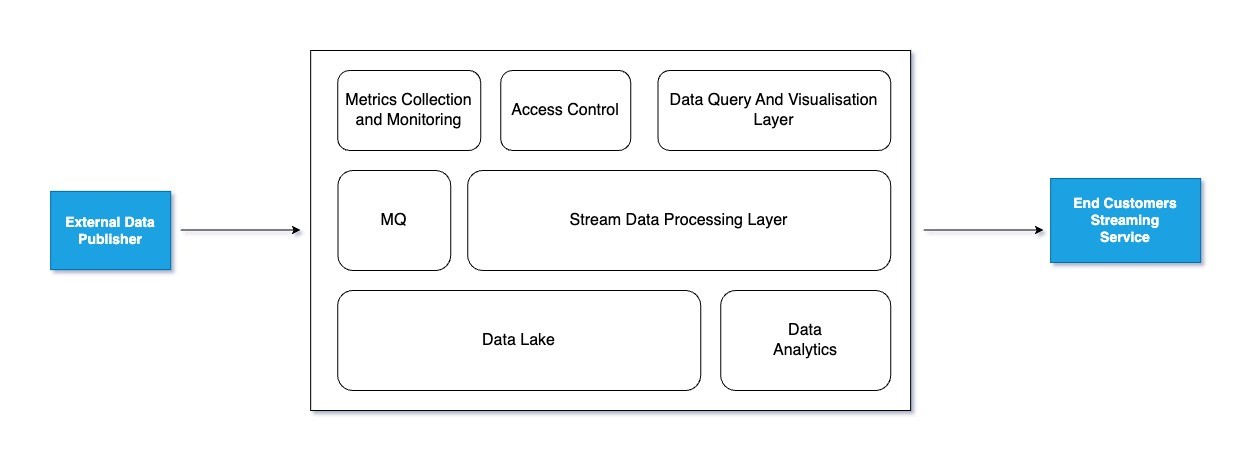
This platform is designed to handle high-volume data ingestion, real-time processing, storage, analytics, and low-latency delivery to customers. The core components are:
- Data Ingestion Layer: Ingests data from multiple sources like S3, Kafka, and Kinesis.
- Processing Layer: Applies transformations, filtering, and schema validation.
- Storage and Analytics Layer: Stores raw and processed data, enabling advanced analytics.
- Customer Delivery Layer: Streams processed data to customers with minimal latency.
High-Level Architecture
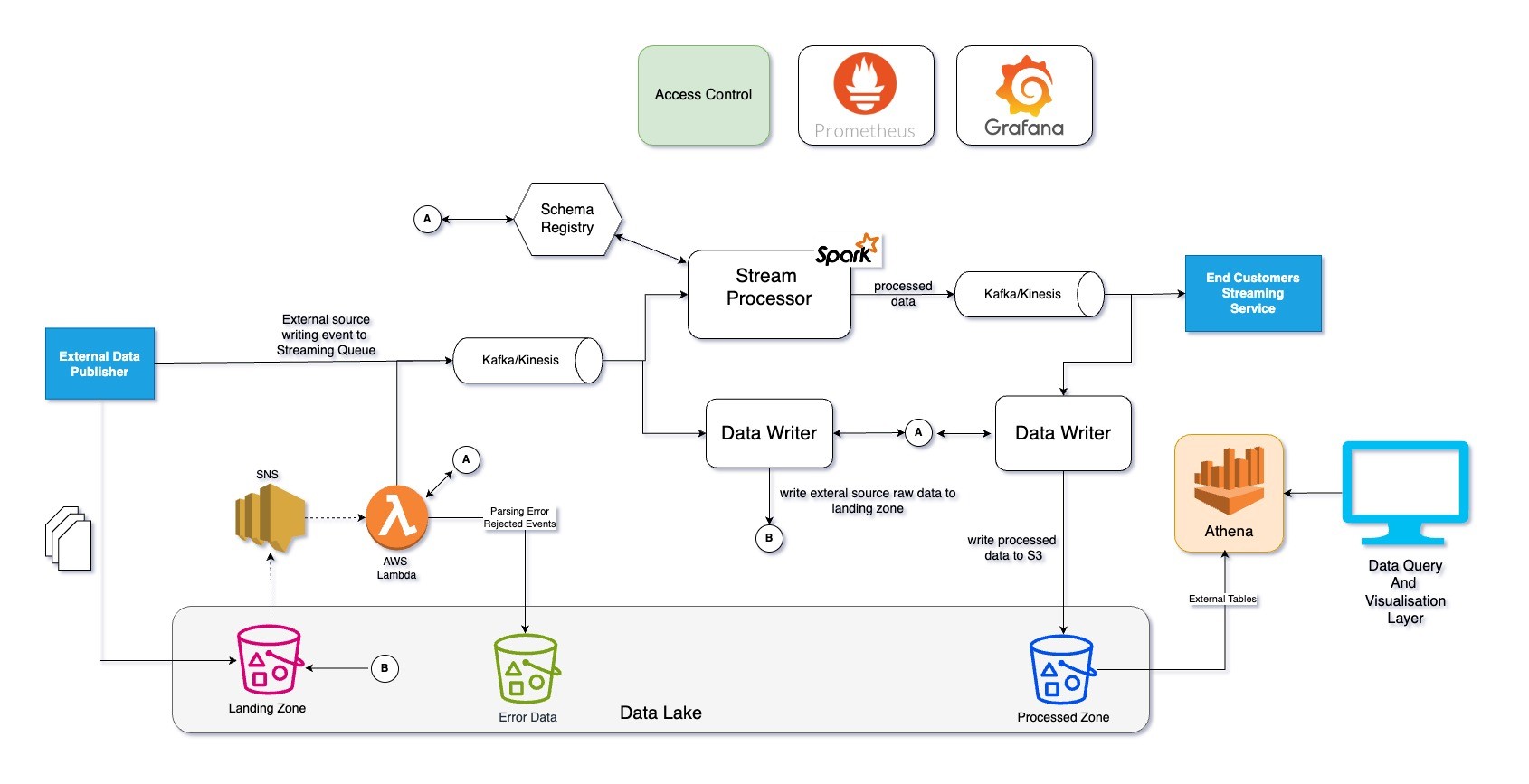
Detail Level Architecture
Data Ingestion Layer
S3 Ingestion
- Data Source: External publishers upload data to the S3 Landing Zone.
- Workflow:
- An SNS Notification is triggered for each new file.
- An AWS Lambda Function:
- Parses and validates the schema.
- Publishes valid events to the messaging queue (Kafka/Kinesis).
- Writes invalid events to an Error Data Bucket.
- Each data source has its own dedicated SNS Topic and Lambda Function.
Kafka/Kinesis Data Sources
- Use Kafka/Kinesis Connectors for event ingestion.
- Publishers validate events against a Schema Registry (e.g., Apache Avro) before publishing.
Data Validation
- Implement a schema registry to enforce schema adherence.
- Route invalid events to an error-handling pipeline.
Processing Layer
Streaming Processing
- Use frameworks like Apache Spark Structured Streaming or Apache Flink for real-time data processing:
- Data Transformation: Format data as required.
- Deduplication: Eliminate duplicate events using event IDs.
- Filtering: Apply custom filtering logic.
- Aggregation: Aggregate data as needed.
Data Writer Job
- Responsible for writing data from Kafka/Kinesis to the S3 bucket.
- Can leverage:
- KStream
- Kinesis Data Firehose
- Spark Streaming or Flink
Latency Control
- Configure streaming jobs with a processing window of less than 10 seconds to maintain low latency.
Storage and Analytics Layer
Raw Data Storage
- Store raw events directly from Kafka/Kinesis to an S3 Landing Zone using separate prefixes or buckets for each data source.
Error Data Storage
- Store rejected data in a dedicated Error Data Bucket with source-specific prefixes.
Processed Data Storage
- Store processed events in an S3 Processed Zone, organised by data source.
Advanced Analytics Framework
- Use Amazon Athena for SQL-based analytics on stored data.
- Alternative OLAP engines: Redshift, Presto, or Apache Druid.
Customer Delivery Layer
Data Delivery Mechanism
- Processed data is written back to Kafka/Kinesis.
- Customer applications consume data directly from these streams.
Access Control
- Implement access management via API Gateway and IAM Policies to enforce customer-specific permissions.
Scalability and Fault Tolerance
Kafka/Kinesis
- Built-in data retention and replay capabilities for scalability and fault tolerance.
Spark/Flink with EMR
- Enable dynamic resource allocation to scale resources based on input data volume.
- Configure the EMR Cluster with auto-scaling policies for optimal resource utilization.
Industrialisation (Automation and Monitoring)
Deployment Automation
- Infrastructure Management: Use AWS CloudFormation or Terraform to define and deploy infrastructure.
- CI/CD Pipeline: Integrate with Jenkins for automated build, testing, and deployment.
Continuous Deployment of Streaming Applications
- Containerisation: Package applications in Docker and orchestrate with Amazon EKS for scalable deployment.
- Version Control: Leverage Kafka with a schema registry to manage schema evolution without breaking downstream applications.
Monitoring and Alerting
a) Infrastructure Monitoring
- Use AWS CloudWatch for real-time monitoring of infrastructure metrics, logs, and latency.
b) Application Monitoring
- Publish streaming job metrics to Prometheus.
- Create dashboards in Grafana for:
- Job resource utilisation
- Business metrics
c) Critical Metrics and Alerts
- Metrics:
- Number of events consumed
- Kafka lag
- Micro-batch execution time
- Number of events sent to the error bucket
- Alerts:
- No data alerts
- Zero events count alerts
- Kafka lag alerts
- Error bucket events alerts
- Streaming job failure alerts
Cost Monitoring
- Tag all resources with relevant metadata (e.g., Project Name, Team, Cost Center).
- Use AWS Budgets and Cost Explorer to track and optimise resource costs in real-time.
Originally published on LinkedIn. See the original post and its comments.